
Alias-Based, Mobile-First Invoicing Meets Real-Time A2A Payments

 To streamline and modernize
recurring billing and invoice collections by enabling
Request for Payments (RfP™) directly from
QuickBooks® Online (QBO) using FedNow® and RTP®
rails, allowing merchants to send secure,
mobile-first digital invoices and receive irrevocable
good funds in real-time.
To streamline and modernize
recurring billing and invoice collections by enabling
Request for Payments (RfP™) directly from
QuickBooks® Online (QBO) using FedNow® and RTP®
rails, allowing merchants to send secure,
mobile-first digital invoices and receive irrevocable
good funds in real-time.
TodayPayments.com bridges
QuickBooks® with real-time banking innovation. We enable
merchants to send Request Bill Payments directly
through QBO, leveraging FedNow® and RTP®
to deliver fast, secure, and automated payment
experiences. From email and SMS invoicing to QR code
payments, we power alias-based real-time payments
that are ISO 20022-compliant, batch-friendly, and ready
for recurring autopay.
Businesses using QuickBooks® Online (QBO) know the value of simple, integrated billing. But traditional ACH and card-based collections introduce delays, declines, and reconciliation headaches.
Now, merchants can easily send a Request Bill Payment via real-time rails like FedNow® and RTP®, right from within QuickBooks®. Using Request for Payments (RfP™), payers receive digital invoices via mobile, email, text, or QR code and complete payments in seconds—no routing numbers or account data required.
With support for alias-based invoicing, ISO 20022 messaging, and hosted payment pages, QBO-integrated RfPs offer a better way to get paid.
From QBO, merchants can:
- Send RfPs via email, SMS, or QR codes
- Direct customers to a branded Hosted Payments Page
- Collect funds through FedNow® or RTP®, instantly and irrevocably
- Use Alias (Email/Phone) identifiers—no need to share account details
All transactions are tracked, timestamped, and ISO 20022-compliant for accurate reconciliation within QuickBooks®.
See
the features
QuickBooks® ACH, Cards, FedNow and Real-Time Payments
- Payment processing for all QuickBooks desktop, Pro, Premier, Enterprise and also QBO QuickBooks Online Our software is designed for simplicity and ease-of-use.
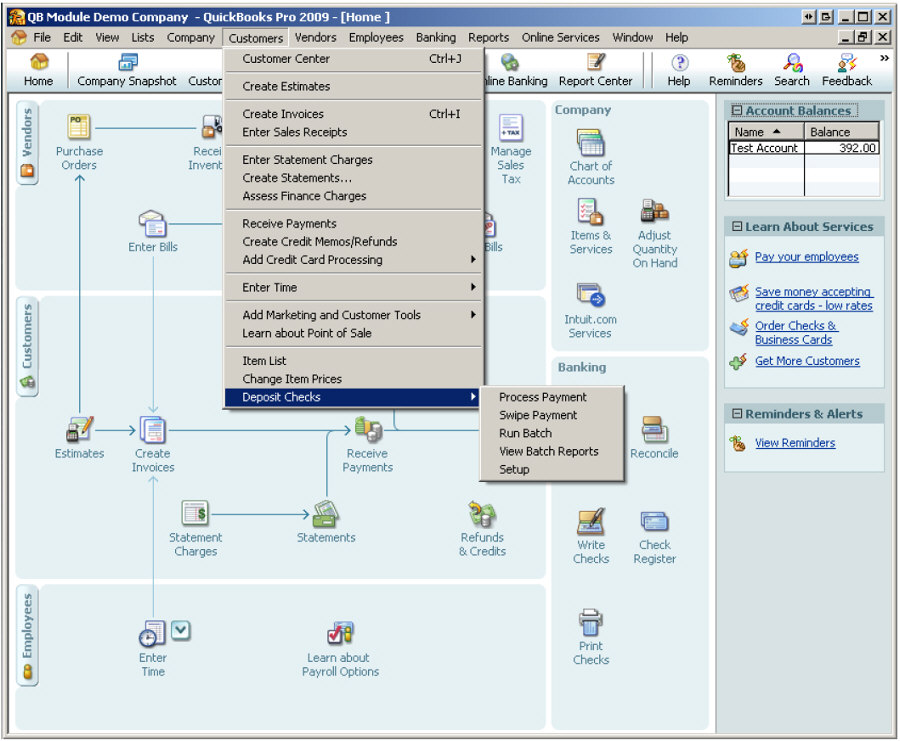
- ~ Automate Account Receivable Collection
- ~ Automate Account Payable Payments
- ~ One-time and Recurring Debits / Credits
Secure QB Plugin payment processing through QuickBooks ® specializes in the origination of moving money electronically.
Recurring Autopay and Batch Billing with ISO 20022 File Support
Using standing approval, customers can enable autopay, so:
- No manual approvals are needed for each recurring bill
- Merchants receive real-time good funds without payment delays
- Batch RfPs using .XML, .JSON, or .CSV file uploads are supported
- Compatible with POS, MOTO, and eCommerce channels
Whether you’re billing for services, subscriptions, or usage-based pricing, it’s all possible—automated and secure.
Request for Payments – Parameters, Attributes, Benefits & Features
|
Attribute |
Description |
|
Integration |
Native QBO (QuickBooks® Online) & FedNow®/RTP® |
|
RfP Delivery |
SMS, Email, QR Code, Mobile Notification, Hosted Page |
|
Payer Authorization |
One-time Standing Approval for Recurring Autopay |
|
Funds Settlement |
Real-Time, Irrevocable, Good Funds |
|
Payment Methods |
A2A via FedNow®, RTP®, fallback: ACH, BNPL, Cards |
|
Batch Uploads |
ISO 20022, Excel, XML, CSV, JSON for B2B/C2B Payments |
|
Remittance Format |
ISO 20022 structured data with invoice ID, due date, status, and notes |
|
Ideal Channels |
POS, MOTO, eCommerce, Mobile, Accounting & CRM |
|
Use Cases |
Invoicing, Recurring Billing, Utilities, SaaS, Healthcare, Professional Services |
Minimum Required ISO 20022 RfP™ Data Fields
To meet ISO 20022 requirements, each RfP must include the following core fields:
|
Field |
Description |
|
MsgId |
Unique message identifier for tracking |
|
CreDtTm |
Timestamp when the RfP is created |
|
EndToEndId |
Invoice or transaction reference (customer-facing) |
|
InstdAmt |
Instructed payment amount and currency |
|
Dbtr/Nm |
Debtor (Payer) alias or name |
|
Cdtr/Nm |
Creditor (Payee) name |
|
DbtrAcct/Id |
Alias-based payer identifier (email or phone) |
|
CdtrAcct/Id |
Alias or account ID for Payee |
|
ReqdExctnDt |
Requested execution/due date |
|
RmtInf/Ustrd |
Unstructured remittance info (invoice memo, notes) |
These fields ensure bank-grade accuracy, instant reconciliation, and regulatory compliance across all real-time rails.
Ask us How:
- Easily send a Request Bill Payment via real-time rails like FedNow® and RTP® integrated through QuickBooks® Online, and receive irrevocable funds instantly.
- Use alias-based identifiers (email, phone) instead of routing and account numbers, simplifying payer authorization and compliance.
- Automate digital invoicing across mobile, email, SMS, and QR code delivery channels, backed by ISO 20022 messaging standards.
- Enable customers to set up “set it and forget it” recurring payments with one-time standing approval—ideal for C2B and B2B use cases.
- Upload batch payment requests to any U.S. bank or credit union using FedNow® and RTP® with ISO 20022 file formats like .XML, .JSON, or .CSV.
To create a Real-Time Request for Payment in QuickBooks Online (QBO), you can follow these steps:
From the QBO dashboard, click on the "+ New" button and select "Invoice" from the drop-down menu.
Select the customer you want to create a Real-Time Request for Payment for from the "Customer" drop-down menu.
Enter the products or services you are invoicing the customer for, along with the amount due and any other relevant details.
Under the "Payment options" section, select "Online bank transfer" or "Credit card" as the payment method you want to accept.
If you haven't set up QuickBooks Payments yet, you'll be prompted to set it up before proceeding. Follow the prompts to complete the setup process.
Click on the "Save and send" button to send the invoice to the customer.
The customer will receive the invoice by email and can click on the payment link to initiate payment in real-time.
Once the payment is received, QuickBooks will automatically update the invoice to show the payment as received.
Note that you can also customize the invoice template and add your company
logo or other branding elements to create a professional-looking invoice.
Additionally, you can set up recurring invoices to save time and streamline your
billing process.
Real-Time Invoicing, Powered by QuickBooks® + TodayPayments.com
With TodayPayments.com, you can now send secure Request for Payments directly from QBO using FedNow® and RTP® rails—and collect real-time, irrevocable good funds instantly.
Deliver a modern customer billing experience
with alias-based identifiers, hosted payment pages, and full ISO 20022
compliance.
Whether you process one-time invoices or recurring payments,
we make getting paid easy, fast, and automated.
👉 Visit https://www.TodayPayments.com to get started and integrate real-time RfPs into your QuickBooks® billing today.
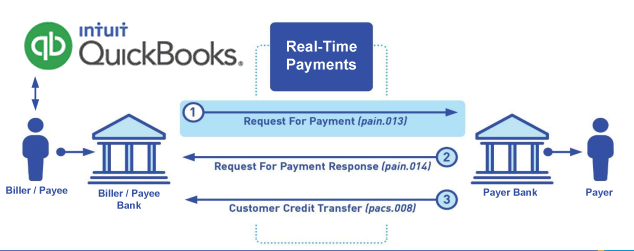
Call us, the .csv and or .xml Request for Payment (RfP) file you need while on your 1st phone call! We guarantee our reports work to your Bank and Credit Union. We were years ahead of competitors recognizing the benefits of RequestForPayment.com. We are not a Bank. Our function as a role as an "Accounting System" in Open Banking with Real-Time Payments to work with Billers to create the Request for Payment to upload the Biller's Bank online platform. U.S. Companies need help to learn the RfP message delivering their bank. Today Payments' ISO 20022 Payment Initiation (PAIN .013) show how to implement Create Real-Time Payments Request for Payment File up front delivering message from the Creditor (Payee) to it's bank. Most banks (FIs) will deliver the message Import and Batch files for their company depositors for both FedNow and Real-Time Payments (RtP). Once uploaded correctly, the Creditor's (Payee's) bank continuing through a "Payment Hub", will be the RtP Hub will be The Clearing House, with messaging to the Debtor's (Payer's) bank.
Our in-house QuickBooks payments experts are standing ready to help you make an informed decision to move your company's payment processing forward.
Pricing with our Request For Payment Professionals
1) Free ISO 20022 Request for Payment File Formats, for FedNow and Real-Time Payments (The Clearing House) .pdf for you manually create "Mandatory" (Mandatory data for completed file) fields, start at page 4, with "yellow" highlighting. $0.0 + No Support
2) We create .csv or .xml formatting using your Bank or Credit Union. Create Multiple Templates. Payer/Customer Routing Transit and Deposit Account Number may be required to import with your bank. You can upload or "key data" into our software for File Creation of "Mandatory" general file.
Fees = $57 monthly, including Support Fees and Batch Fee, Monthly Fee, User Fee, Additional Payment Method on "Hosted Payment Page" (Request for file with an HTML link per transaction to "Hosted Payment Page" with ancillary payment methods of FedNow, RTP, ACH, Cards and many more!) + $.03 per Transaction + 1.5% percentage on gross dollar file,
3) Payer Routing Transit and Deposit Account Number is NOT required to import with your bank. We add your URI for each separate Payer transaction.
Fees Above 2) plus $29 monthly additional QuickBooks Online "QBO" formatting, and "Hosted Payment Page" and WYSIWYG
4) Above 3) plus Create "Total" (over 600 Mandatory, Conditional & Optional fields of all ISO 20022 Pain .013) Price on quote.
Start using our FedNow Real-Time Payments Bank Reconciliation:
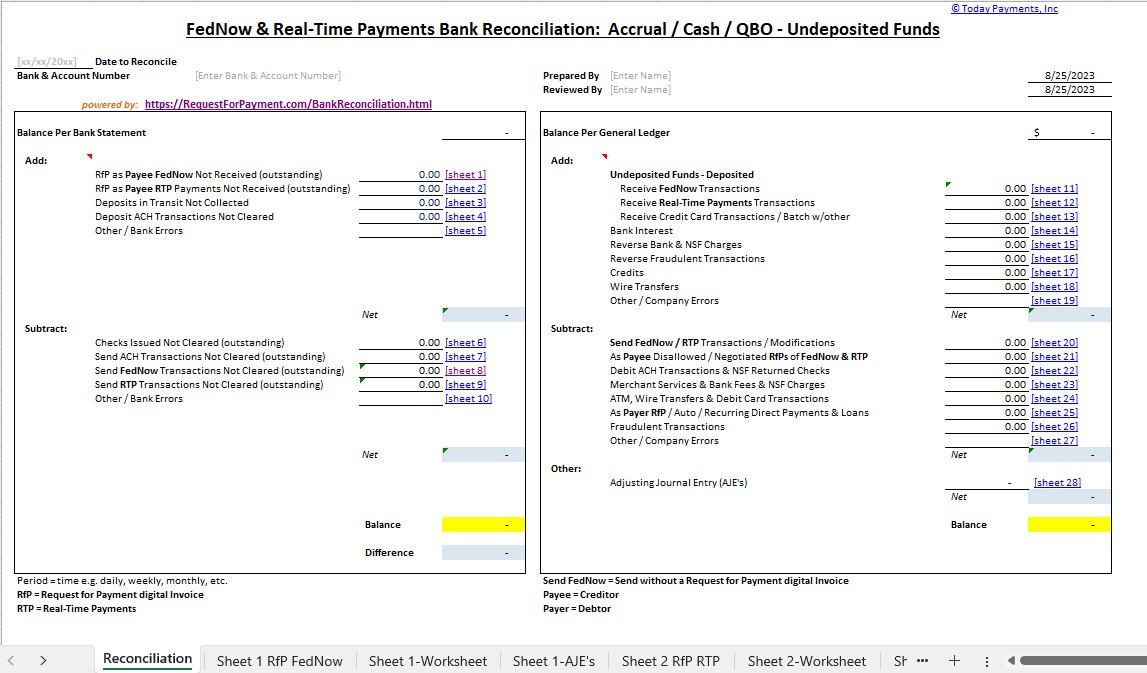
Dynamic integrated with FedNow & Real-Time Payments (RtP) Bank Reconciliation: Accrual / Cash / QBO - Undeposited Funds
Give Us A Call
(866) 927-7180